
[STM32MP25] BSP I/O 데모: 버튼 → BME280 → HTTP (Yocto/systemd)
안녕하세요, pingu52입니다.
임베디드 I/O 기초: GPIO/I2C/SPI/UART 실습의 형태로, 보드에서 이벤트가 발생하면 센서값을 읽어 서버로 전송하는 최소 경로(DoD) 를 구현해 봤습니다.
저는 아직 외부 LED/버튼 부품이 없어서, 보드에 기본으로 탑재된 버튼(gpio-keys → /dev/input/eventX) 과 기본 LED(/sys/class/leds) 를 활용했습니다. I2C 센서는 앞서 bring-up 한 BME280(IIO sysfs) 를 그대로 재사용합니다.
구성 개요
- 입력(GPIO): 보드 기본 버튼 → Linux input subsystem(
/dev/input/event0) 이벤트 감지 - 센서(I2C): BME280 → IIO sysfs(
in_temp_input,in_humidityrelative_input,in_pressure_input) 값 읽기 - 네트워크: userspace에서 HTTP POST(JSON)로 서버 전송
- 서비스: systemd로 부팅 시 자동 실행
구성 흐름은 아래 한 줄로 요약됩니다.
button(gpio-keys) → bme280(IIO) → HTTP POST(JSON)
전제 조건
- OpenSTLinux 부팅 완료, root 쉘 접근 가능
- BME280 bring-up 완료(IIO sysfs에서 값 읽기 가능)
- 보드가 서버(PC)와 같은 L2/L3 망에 있고, HTTP 포트가 열려 있음
1. 버튼(gpio-keys) / LED 리소스 확인
1.1 gpio-keys가 어떤 input event로 잡혔는지 확인
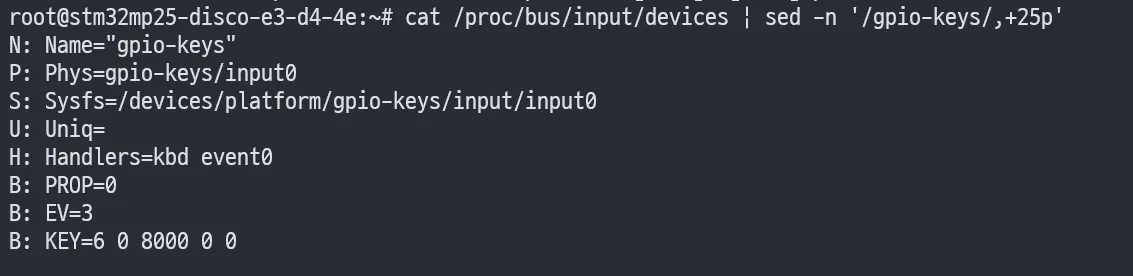
보드에 기본으로 올라간 버튼은 보통 gpio-keys로 구성되어 있고, 결과적으로 Linux에서는 키보드 이벤트처럼 /dev/input/eventX로 노출됩니다.
cat /proc/bus/input/devices | sed -n '/gpio-keys/,+25p'아래처럼 Name="gpio-keys", Handlers=kbd event0가 보이면, 이 보드에서는 버튼 이벤트가 /dev/input/event0으로 들어온다는 의미입니다.
TIP
evtest /dev/input/event0(패키지 설치 필요)로도 쉽게 키 코드가 확인됩니다.
1.2 LED class 디바이스 확인 및 수동 제어
보드 기본 LED는 /sys/class/leds/ 아래에 노출됩니다.
ls -1 /sys/class/leds예를 들어 blue:heartbeat 같은 이름이 보이면, 아래처럼 트리거를 끄고(=none) 밝기를 직접 제어할 수 있습니다.
LED=blue:heartbeat
# 현재 trigger 확인cat /sys/class/leds/${LED}/trigger
# 트리거를 none으로 바꾸면 brightness로 직접 제어 가능echo none > /sys/class/leds/${LED}/trigger
# ON/OFFecho 1 > /sys/class/leds/${LED}/brightnesssleep 1echo 0 > /sys/class/leds/${LED}/brightness2. 서버(PC) 준비: 최소 수신기(recv.py)
저는 PC에서 간단히 Python HTTP 서버로 /ingest를 받아 로그로 찍는 방식으로 시작했습니다.
2.1 ping이 안 되는데 HTTP가 되는 경우
처음에 서버 IP로 ping이 안 간다에서 멈출 수 있는데, Windows 방화벽 정책 등에 따라 ICMP Echo(ping)만 막고 TCP는 허용되는 구성이 흔합니다.
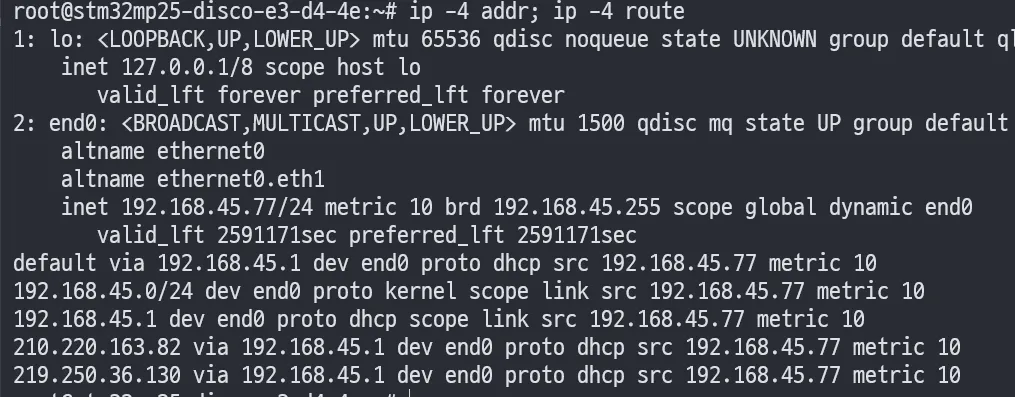
실제로 보드에서 라우팅은 정상으로 잡혀 있었습니다.

그리고 TCP 레벨에서는 연결까지는 되었지만, 서버가 예외로 죽어서 Empty reply from server가 발생하는 상태였습니다.
따라서 이 단계에서는 ping 유무보다 HTTP 요청이 정상 응답(예: 204/200)을 받는지를 먼저 확인하는 편이 작업이 빠릅니다.
2.2 수신 서버 코드(예외 수정 포함)
아래는 제가 사용한 최소 수신 서버입니다.
from http.server import BaseHTTPRequestHandler, HTTPServerfrom datetime import datetime
class Handler(BaseHTTPRequestHandler): def do_POST(self): n = int(self.headers.get('Content-Length', '0')) body = self.rfile.read(n).decode('utf-8', errors='replace')
ts = datetime.now().isoformat(timespec='microseconds') print(f"{ts} {self.client_address[0]} {self.path} {body}")
# 204 No Content self.send_response(204) self.end_headers()
def log_message(self, fmt, *args): # 기본 access log를 끄고 싶으면 pass return
if __name__ == '__main__': addr = ('0.0.0.0', 18000) print(f"listening on http://{addr[0]}:{addr[1]}/ingest") HTTPServer(addr, Handler).serve_forever()실행:
python recv.py3. userspace 앱(bsp-io-demo): 버튼 이벤트로 BME280 읽고 HTTP POST
3.1 동작 요구사항(DoD)
- 버튼 입력 발생 → BME280 센서값 1회 읽기
- JSON payload 구성 → 서버
/ingest로 HTTP POST - 성공/실패를 journal 로그로 남기기
3.2 참고 구현(단일 C 파일)
아래는 최소 동작을 목표로 한 단일 파일 구현 예시입니다.
- 입력:
/dev/input/event0에서struct input_event읽기 - 센서: IIO sysfs 파일을 직접 읽기(값 없으면 error payload)
- 전송: libcurl로 HTTP POST
- 설정:
SERVER_URL,INPUT_EVENT,LED_NAME환경변수로 런타임 주입
#define _GNU_SOURCE#include <errno.h>#include <fcntl.h>#include <linux/input.h>#include <signal.h>#include <stdio.h>#include <stdlib.h>#include <stdarg.h>#include <string.h>#include <sys/stat.h>#include <sys/types.h>#include <time.h>#include <unistd.h>
#include <curl/curl.h>
static volatile int g_stop = 0;
static void on_sigint(int sig) { (void)sig; g_stop = 1;}
static void logi(const char *fmt, ...) { va_list ap; va_start(ap, fmt); printf("[INFO] "); vprintf(fmt, ap); printf("\n"); fflush(stdout); va_end(ap);}
static void logw(const char *fmt, ...) { va_list ap; va_start(ap, fmt); printf("[WARN] "); vprintf(fmt, ap); printf("\n"); fflush(stdout); va_end(ap);}
static int read_file_to_buf(const char *path, char *buf, size_t buflen) { int fd = open(path, O_RDONLY | O_CLOEXEC); if (fd < 0) return -1; ssize_t n = read(fd, buf, buflen - 1); close(fd); if (n <= 0) return -1; buf[n] = '\0'; // trim newline char *p = strchr(buf, '\n'); if (p) *p = '\0'; return 0;}
static int write_str(const char *path, const char *s) { int fd = open(path, O_WRONLY | O_CLOEXEC); if (fd < 0) return -1; ssize_t n = write(fd, s, strlen(s)); close(fd); return (n == (ssize_t)strlen(s)) ? 0 : -1;}
static void led_pulse_once(const char *led_name) { if (!led_name || !*led_name) return;
char trig[256]; char bri[256]; snprintf(trig, sizeof(trig), "/sys/class/leds/%s/trigger", led_name); snprintf(bri, sizeof(bri), "/sys/class/leds/%s/brightness", led_name);
// best-effort: disable trigger and pulse (void)write_str(trig, "none"); (void)write_str(bri, "1"); usleep(80 * 1000); (void)write_str(bri, "0");}
static int find_bme280_iio(char *out_dir, size_t out_len) { // 아주 단순하게 iio:device0~9를 훑어보고 name==bme280인지 확인 for (int i = 0; i < 10; i++) { char namep[128]; char name[64]; snprintf(namep, sizeof(namep), "/sys/bus/iio/devices/iio:device%d/name", i); if (read_file_to_buf(namep, name, sizeof(name)) == 0) { if (strcmp(name, "bme280") == 0 || strcmp(name, "bmp280") == 0) { snprintf(out_dir, out_len, "/sys/bus/iio/devices/iio:device%d", i); return 0; } } } return -1;}
static int read_bme280_raw(long *temp_raw, long *hum_raw, double *press_kpa) { char base[128]; if (find_bme280_iio(base, sizeof(base)) < 0) { return -1; }
char p_temp[256], p_hum[256], p_press[256]; char b[64];
snprintf(p_temp, sizeof(p_temp), "%s/in_temp_input", base); snprintf(p_hum, sizeof(p_hum), "%s/in_humidityrelative_input", base); snprintf(p_press, sizeof(p_press), "%s/in_pressure_input", base);
if (read_file_to_buf(p_temp, b, sizeof(b)) < 0) return -1; *temp_raw = strtol(b, NULL, 10);
if (read_file_to_buf(p_hum, b, sizeof(b)) < 0) return -1; *hum_raw = strtol(b, NULL, 10);
if (read_file_to_buf(p_press, b, sizeof(b)) < 0) return -1; long press_pa = strtol(b, NULL, 10);
// Pa -> kPa (102739 Pa -> 102.739 kPa) *press_kpa = ((double)press_pa) / 1000.0; return 0;}
static size_t discard_cb(void *ptr, size_t size, size_t nmemb, void *userdata) { (void)ptr; (void)userdata; return size * nmemb;}
static int http_post_json(const char *url, const char *json) { CURL *curl = curl_easy_init(); if (!curl) return -1;
struct curl_slist *hdrs = NULL; hdrs = curl_slist_append(hdrs, "Content-Type: application/json");
curl_easy_setopt(curl, CURLOPT_URL, url); curl_easy_setopt(curl, CURLOPT_HTTPHEADER, hdrs); curl_easy_setopt(curl, CURLOPT_POSTFIELDS, json); curl_easy_setopt(curl, CURLOPT_WRITEFUNCTION, discard_cb); curl_easy_setopt(curl, CURLOPT_TIMEOUT, 3L);
CURLcode rc = curl_easy_perform(curl);
long http_code = 0; curl_easy_getinfo(curl, CURLINFO_RESPONSE_CODE, &http_code);
curl_slist_free_all(hdrs); curl_easy_cleanup(curl);
if (rc != CURLE_OK) { return -1; } if (http_code < 200 || http_code >= 300) { return -1; } return 0;}
int main(void) { signal(SIGINT, on_sigint); signal(SIGTERM, on_sigint);
const char *server_url = getenv("SERVER_URL"); const char *input_event = getenv("INPUT_EVENT"); const char *led_name = getenv("LED_NAME");
if (!server_url) server_url = "http://192.168.45.231:18000/ingest"; if (!input_event) input_event = "/dev/input/event0"; if (!led_name) led_name = "blue:heartbeat";
logi("SERVER_URL=%s", server_url); logi("LED_NAME=%s", led_name); logi("INPUT_EVENT=%s", input_event);
if (curl_global_init(CURL_GLOBAL_DEFAULT) != 0) { logw("curl_global_init failed"); return 1; }
int fd = open(input_event, O_RDONLY | O_CLOEXEC); if (fd < 0) { logw("open(%s) failed: %s", input_event, strerror(errno)); curl_global_cleanup(); return 1; }
while (!g_stop) { struct input_event ev; ssize_t n = read(fd, &ev, sizeof(ev)); if (n < 0) { if (errno == EINTR) continue; logw("read input_event failed: %s", strerror(errno)); break; } if (n != (ssize_t)sizeof(ev)) continue;
if (ev.type == EV_KEY && ev.value == 1) { // key press long t = 0, h = 0; double p = 0.0;
char payload[256]; if (read_bme280_raw(&t, &h, &p) < 0) { logw("sensor read failed; sending empty payload"); snprintf(payload, sizeof(payload), "{\"sensor\":\"bme280\",\"error\":\"read_failed\"}"); } else { snprintf(payload, sizeof(payload), "{\"sensor\":\"bme280\",\"temp_raw\":\"%ld\",\"hum_raw\":\"%ld\",\"press_raw\":\"%.9f\"}", t, h, p); }
logi("key_press code=%u -> POST %s payload=%s", ev.code, server_url, payload); led_pulse_once(led_name);
int ok = http_post_json(server_url, payload); logi("post_result=%s", ok == 0 ? "OK" : "FAIL"); } }
close(fd); curl_global_cleanup(); return 0;}4. Yocto(meta-myboard)로 패키징: 이미지 포함 + systemd 자동 실행
이 글에서는 커널/DT를 건드리지 않고, userspace 앱을 레이어에서 패키징해서 이미지에 포함시키는 쪽에 집중합니다.
4.1 레이어 파일 배치(예시)
meta-myboard에 아래처럼 배치하는 구성을 기준으로 합니다.
github stm32mp257f-bsp-lab를 기반으로 작성하였습니다.
meta-myboard/ recipes-apps/ bsp-io-demo/ files/ bsp-io-demo.c bsp-io-demo.service bsp-io-demo.conf bsp-io-demo_1.0.bb recipes-st/images/ st-image-weston.bbappend4.2 레시피(bsp-io-demo_1.0.bb)
LIC_FILES_CHKSUM은 빌드 로그에서 나온 새로운 md5 값으로 맞춥니다.
# bsp-io-demo_1.0.bb
SUMMARY = "BSP IO demo (button -> bme280 -> http)"LICENSE = "MIT"LIC_FILES_CHKSUM = "file://${COMMON_LICENSE_DIR}/MIT;md5=0835ade698e0bcf8506ecda2f7b4f302"
SRC_URI = "\ file://bsp-io-demo.c \ file://bsp-io-demo.service \ file://bsp-io-demo.conf \"
S = "${WORKDIR}"
inherit systemd pkgconfig
DEPENDS += "curl"
SYSTEMD_SERVICE:${PN} = "bsp-io-demo.service"SYSTEMD_AUTO_ENABLE:${PN} = "enable"
do_compile() { ${CC} ${CFLAGS} ${LDFLAGS} \ -o bsp-io-demo bsp-io-demo.c \ $(${PKG_CONFIG} --cflags --libs libcurl)}
do_install() { install -d ${D}${bindir} install -m 0755 bsp-io-demo ${D}${bindir}/bsp-io-demo
install -d ${D}${systemd_system_unitdir} install -m 0644 ${WORKDIR}/bsp-io-demo.service ${D}${systemd_system_unitdir}/
install -d ${D}${sysconfdir} install -m 0644 ${WORKDIR}/bsp-io-demo.conf ${D}${sysconfdir}/bsp-io-demo}TIP위에서 중요한 포인트는
--libs가 쉘에서 명령으로 오해되지 않도록$(${PKG_CONFIG} ...)형태로 감싸는 것입니다.
4.3 systemd 유닛(bsp-io-demo.service)
[Unit]Description=BSP IO DEMO (button -> bme280 -> http)After=network-online.targetWants=network-online.target
[Service]Type=simpleEnvironmentFile=-/etc/bsp-io-demoExecStart=/usr/bin/bsp-io-demoRestart=alwaysRestartSec=1
[Install]WantedBy=multi-user.target4.4 환경 설정 파일(bsp-io-demo.conf)
# bsp-io-demo
SERVER_URL=http://<본인 서버 IP>:18000/ingestINPUT_EVENT=/dev/input/event0LED_NAME=blue:heartbeat4.5 이미지에 포함(st-image-weston.bbappend)
# st-image-weston.bbappend
IMAGE_INSTALL:append = " bsp-io-demo"5. 런타임 검증(보드)
5.1 서비스 기동 확인
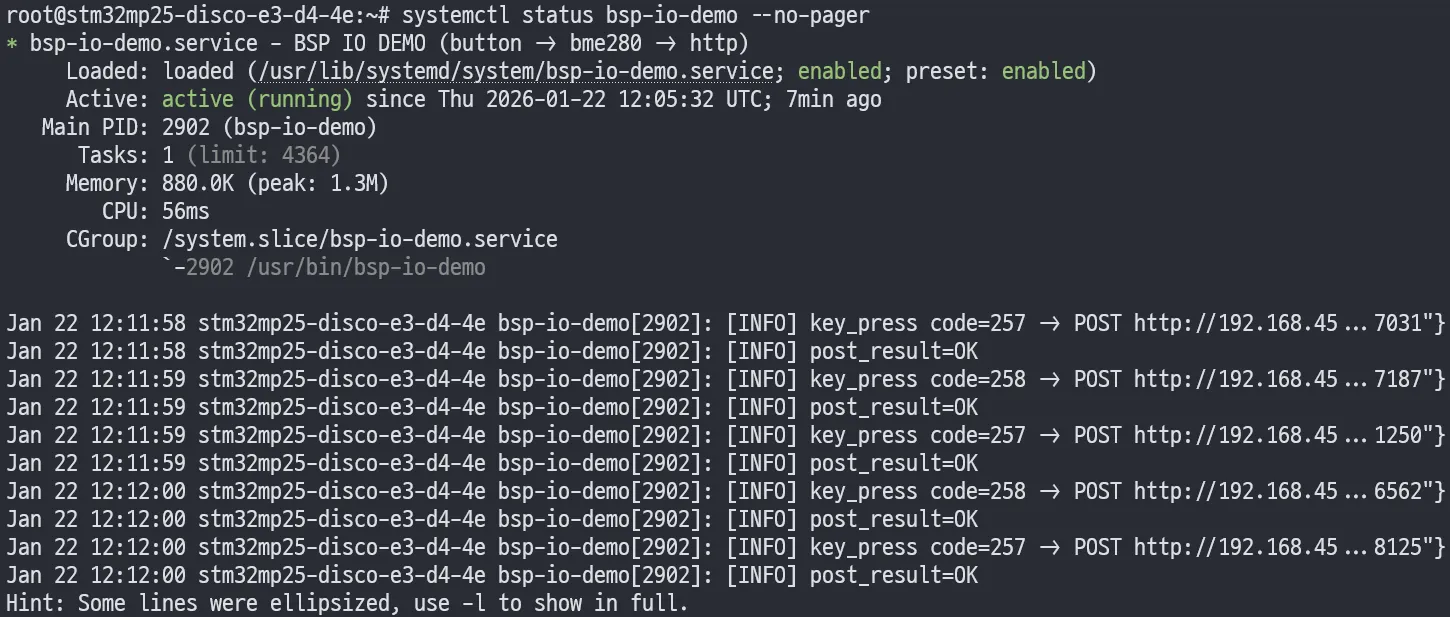
systemctl status bsp-io-demo --no-pager서비스가 active (running)이고, 환경변수가 로그에 찍히면 1차 OK입니다.
서비스 시작 직후 journal에 SERVER_URL/LED_NAME/INPUT_EVENT가 출력되면, systemd 환경변수 주입까지 정상입니다.

TIPunit 파일을 수정했는데 “changed on disk” 경고가 뜨면
systemctl daemon-reload후 서비스를 재시작합니다.
5.2 HTTP 전송 성공 확인(journal + 서버 로그)
버튼을 눌렀을 때 보드에서 아래처럼 post_result=OK가 찍히면 전송 성공입니다.

서버 측에서는 요청이 들어오면서 204 응답이 찍힙니다.

6. 트러블슈팅 포인트
6.1 네트워크가 의심되면: 라우팅/주소부터 확인
ip -4 addrip -4 routeip route get <본인 서버 IP>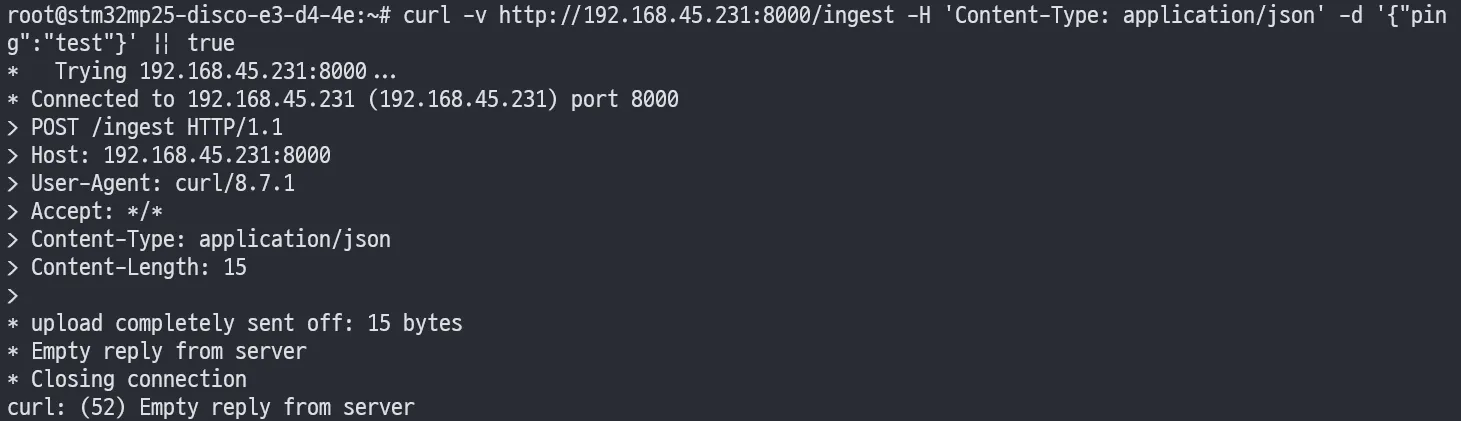
6.2 Empty reply from server는 서버가 예외로 연결을 끊는 경우가 많음
보드에서 curl -v로 확인했을 때 연결은 되는데 응답이 비어 있으면(=서버가 제대로 응답 못함) 서버 콘솔/로그에서 예외를 확인합니다.
6.3 sensor read failed가 뜨는 경우
- BME280 IIO 디바이스 번호가 바뀌었을 수 있음(
/sys/bus/iio/devices/iio:deviceX/) - 필요한 sysfs 파일명이 환경에 따라 다를 수 있음
for d in /sys/bus/iio/devices/iio:device*; do echo "== $d =="; cat "$d/name" 2>/dev/null || true; ls -1 "$d" | grep -E 'temp|press|humid' || true; echo;done6.4 systemd 유닛 변경 경고(“changed on disk”)
systemctl status에 아래 경고가 보이면, 유닛 파일이 변경되었는데 systemd가 아직 반영하지 않은 상태입니다.
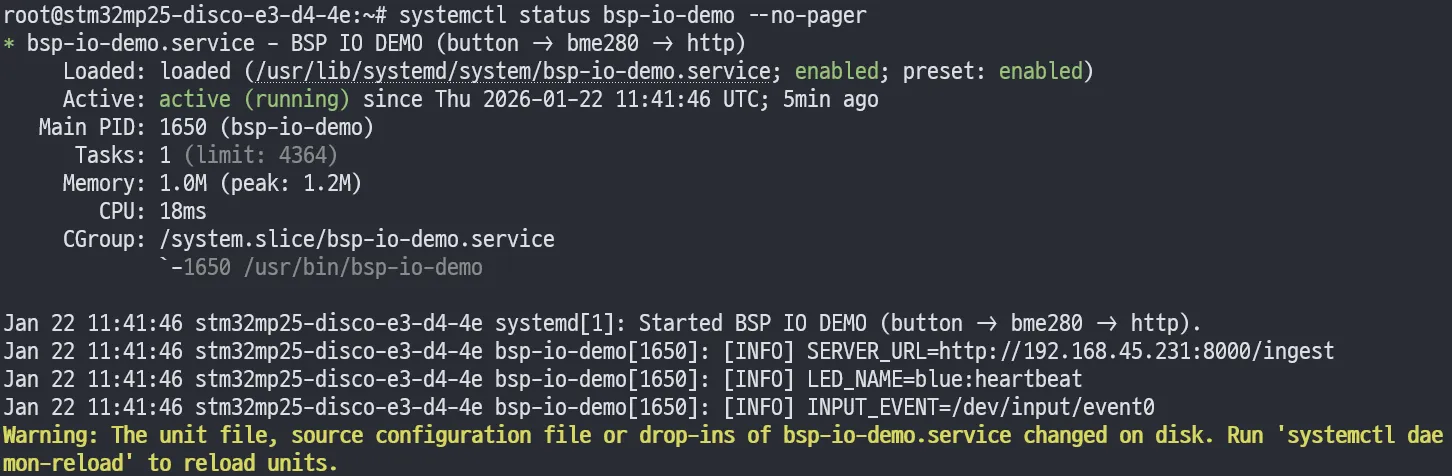
systemctl daemon-reloadsystemctl restart bsp-io-demo참고
-
ST wiki: How to control a GPIO in userspace (libgpiod, userspace GPIO) https://wiki.st.com/stm32mpu/wiki/How_to_control_a_GPIO_in_userspace
-
ST wiki: GPIOLib overview https://wiki.st.com/stm32mpu/wiki/GPIOLib_overview
-
Linux kernel Device Tree binding: gpio-keys https://www.kernel.org/doc/Documentation/devicetree/bindings/input/gpio-keys.txt
-
Linux kernel ABI (IIO sysfs: in_temp_input, in_pressure_input, in_humidityrelative_input 등) https://www.kernel.org/doc/Documentation/ABI/testing/sysfs-bus-iio
-
Yocto Project Dev Manual: Working With Licenses (LIC_FILES_CHKSUM) https://docs.yoctoproject.org/dev-manual/licenses.html
-
(참고) Yocto 메일링리스트: PKG_CONFIG가 비어 있는 케이스/맥락 https://docs.yoctoproject.org/pipermail/yocto/2019-November/047314.html
-
systemd.exec(5): EnvironmentFile= (서비스 환경파일 로딩) https://www.freedesktop.org/software/systemd/man/systemd.exec.html